Archive

Archive for the ‘PSPgo FAQs’ Category

Can I use old PSP accessories with the PSPgo?

January 8th, 2009
Comments Off

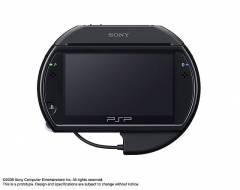
Your old PSP headphones can be used with the PSPgo, but any other accessory is not directly compatible with the PSPgo. The PSPgo Converter allows you to use accessories like the Go!Cam, GPS device and Talkman Mic with the PSPgo. The converter makes the PSPgo less portable and also makes it look uglier, but its the only way you can make use of your old stuff.

Categories: PSPgo FAQs Tags: , ,

Does the PSPgo have in-game XMB access?

January 7th, 2009
Comments Off

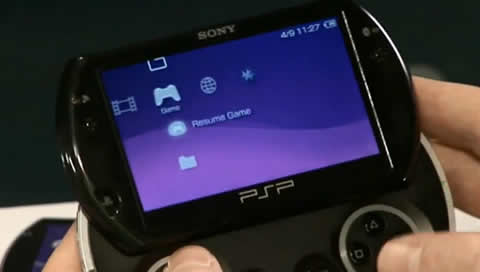
The XMB cannot be accessed directly within a game but the PSPgo does feature a Pause Game option. If you need to access the XMB during a game. Press the PS button and choose [Quit/Pause Game], then select [Pause Game] to save the game to temporary memory. You will be able to XMB and then resume the game from where you left off.

To resume the game, go to the [Game] menu on the XMB and select [Resume Game]. The game will continue from where you paused it. You can play another game while there is a paused game, but pausing another game will overwrite the previous paused game.

Categories: PSPgo FAQs Tags: ,

Can a PlayStation 3 Controller be used with the PSPgo?

January 6th, 2009
Comments Off

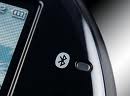
Yes. Using Blue-tooth connectivity, you can pair your PSP with a controller to play games. In order to pair your PSPgo with a PS3 Controller, you will need:

  • PSPgo System
  • PS3 System
  • DualShock 3 or SIXAXIS Controller
  • PSPgo USB Cable
  • PS3 Controller USB Cable

To pair your PSPgo with the controller, go to the [Settings] menu on the XMB and select the [Bluetooth Device Settings] option. Select [Bluetooth Device Management] and choose to register a PS3 System controller.

Categories: PSPgo FAQs Tags: ,

What colours is the PSPgo available in?

January 5th, 2009
Comments Off

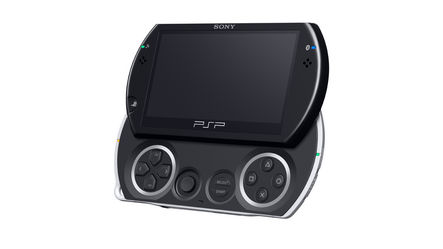
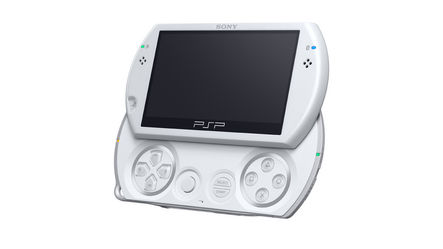
The PSPgo is currently available in two colours: Piano Black and Pearl White. Both units retail for £225 / $249. More colours are expected to be announced in the future.

Categories: PSPgo FAQs Tags:

What new functionality does the PSPgo offer?

January 4th, 2009
Comments Off

The PSPgo features most of the same functionality as the older PSP models, with a few exceptions. The PSPgo lacks a UMD drive but has 16GB of built-in flash storage. The PSPgo also has blue-tooth connectivity allowing you to use a PS3 Wireless Controller to play games or connect to the Internet using Bluetooth Modems or via Mobile Phones.

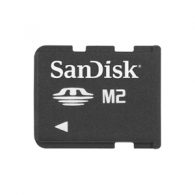
The PSPgo also uses M2 Memory Stick storage instead of the Memory Stick Duo found in the older PSPs. The USB connection on the PSPgo is different to older models – it is used for both connecting to the PS3/PC and for charging the unit. A built-in microphone is included in so a special headset is not required.

Categories: PSPgo FAQs Tags: ,

Can the PSPgo play UMD games?

January 4th, 2009
Comments Off

The PSPgo does not have a physical UMD drive, making the unit much more compact and light. You can, however, play old UMD titles by purchasing them from the PlayStation Store. Hundreds of titles are available to purchase from the PlayStation Store, with new titles added each week.

Use the Media Go application or visit the PlayStation store on your PSP or PS3 to see what’s available.

Categories: PSPgo FAQs Tags: ,

How much space available on the PSPgo?

January 3rd, 2009
Comments Off

The PSPgo comes with 16GB of flash memory, build into the unit. Of the 16GB available, 14GB is available for usage. The other 2GB is reserved for system use and temporary data. The available memory can be further expanded using a M2 Memory Stick, available up to 32GB.

How can I see the remaining battery time on the PSPgo?

January 2nd, 2009
Comments Off

With older PSP models, Battery Information can be viewed from the [Settings] > [System Information] menu. With the PSPgo, this menu has been removed. The only indication of battery life is the battery icon on the top right corner of the screen.

Categories: PSPgo FAQs Tags: ,

How can I replace the battery on the PSPgo?

January 1st, 2009
Comments Off

The PSPgo’s battery cannot be replaced like the older PSP models. The unit must be sent to Sony for installation of a replacement battery. Sony will take several weeks to install a new battery and will charge for a replacement.

Categories: PSPgo FAQs Tags: ,